
Chapter FAQ, Guides, Tips & Hints
Pre-Boarding
Prepare for Chapter Application
Learn more about ACM-W Chapters:
- Contact acmw-chapters@acm.org to schedule a training session or workshop for your local community of women in computing
- Watch ACM-W Student Chapter Playlist on Youtube
- Watch ACM-W Professional Chapter Playlist on Youtube
- Read ACM-W Chapters
Decide the Chapter Type
Choose whether you are forming an ACM‑W Professional Chapter or an ACM‑W Student Chapter.
- Student chapters are composed of college students affiliated with a college, tech school or university.
- Professional chapters are composed of a geographically local community of professionals in either academia or industry, at all stages of their career.
Review Requirements and Bylaws
Read the ACM-W Chapter Bylaws to understand officer roles, membership requirements, and governance structure.
Recruit Founding Officers
- Professional chapters: Chair, Vice Chair, Treasurer (all must be ACM members with ACM Member ID).
- Student chapters: Chair, Vice Chair (ACM Student Members, with ACM Member ID), Faculty Sponsor (ACM Professional Member, with ACM Member ID).
Begin Member Recruitment
- Chapters need ten members to start.
- Recruit members from your colleagues and professional network
- Reach out to members of local ACM chapters, tech SIGS, etc.
- Use personal invitations and campus/professional networks.
- If you have fewer than 10 members,
- request ACM to send a recruitment email: local_activities@acm.org
- Search on LinkedIn for accounts in your local area with an interest in IT/CS
- Look at local businesses for members of their IT department
- Search local schools for IT/CS faculty
Build your chapter identity
- Chapter Name – Chapters must be named according to ACM’s naming convention.
- Student chapters must name their chapter after their school. ‘School Name ACM-W Student Chapter’ (ex: University of Computing ACM-W Student Chapter)
- Professional Chapters must name themselves after a computing topic, industry, company, job function, or city they are based in. ACM-W Professional Chapter: ‘Name ACM-W Chapter’ (ex: Timbuktu ACM-W Chapter)
- Please note: ACM no longer accepts country-wide chapters as they prevent the formation of future chapters in that nation. This is a growth driven decision. City-wide chapters are more effective in attracting attention and participants, and are more successful in managing and organizing.
- Chapter Email – Your chapter should have its own email address, distinct from the personal accounts of officers.
Submit the Initial Chapter Application
- Chapter Application Pre-approval Checklist:
- (Optionally) Use the Chapter Application worksheet to organize your application information.
- Complete formal application http://www.acm.org/chapters/start-chapter
- Wait 1-2 weeks for your application to be approved.
- After submission, your materials will be reviewed by regional ACM‑W representatives, the Global Chapter Committee Chair, and the ACM‑W Executive Committee. This review ensures the proposed chapter structure, officers, and plans align with ACM standards and meet the required governance expectations before the chapter is formally approved. Email acmw-chapters@acm.org with any questions or concerns.
Charter & Setup
Hooray! Your Chapter has been officially chartered!
Create the Chapter ACM Web Account
To request your chapter web account, submit your chapter’s email address https://accounts.acm.org/chap/chap_acct.cfm You will receive instructions by email to that address. Please note that your email address for your chapter must be distinct from your ACM member web accounts.
Access the Chapter Administrative Interface
Log into the chapter admin interface
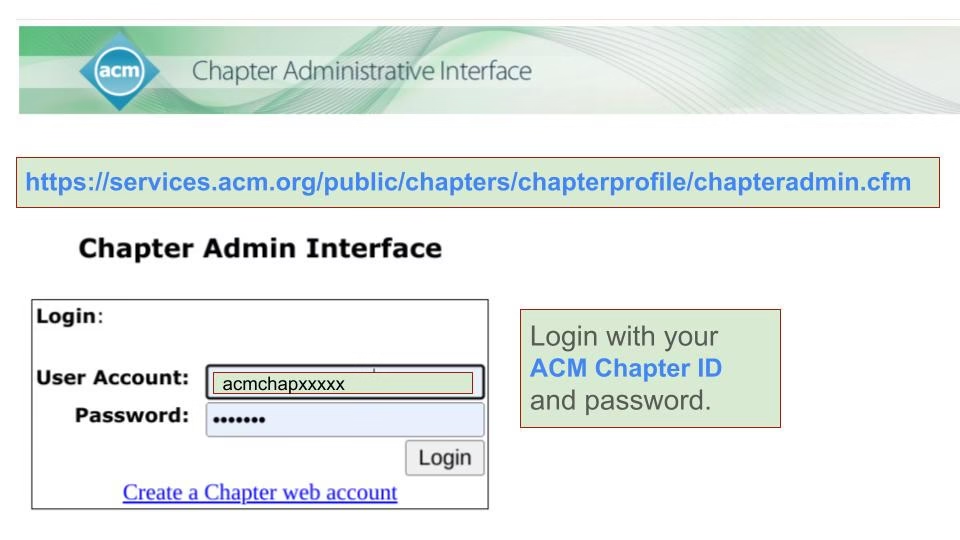
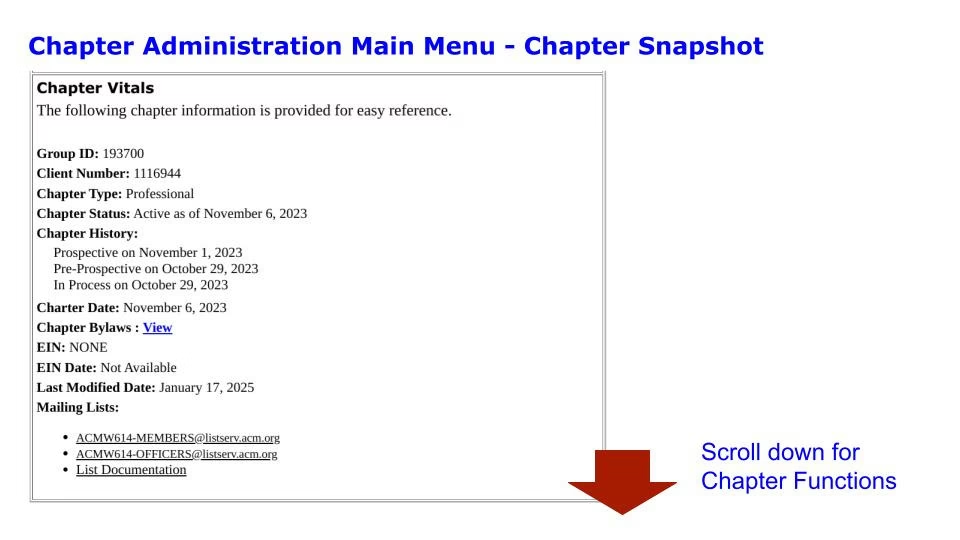
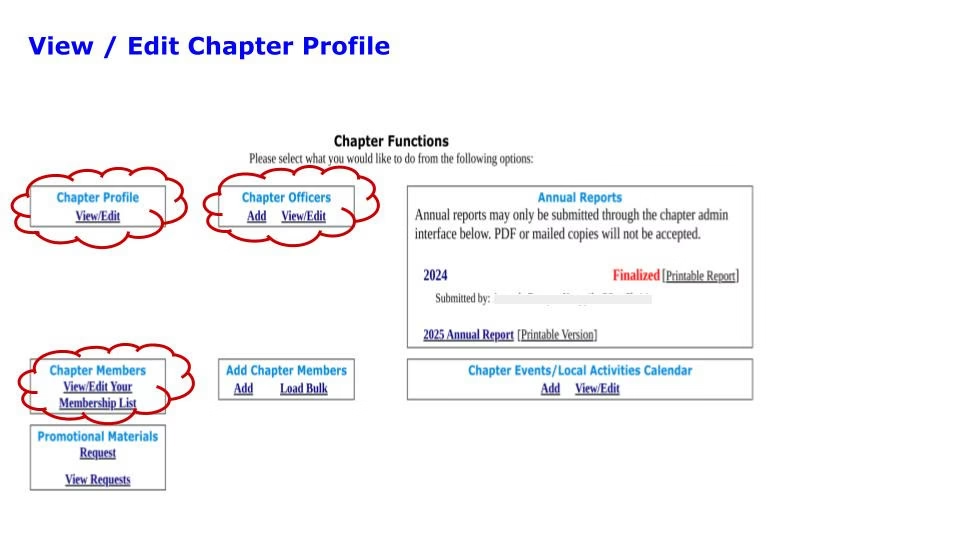
Manage your roster, officer contacts, chapter information, and required reports.
Meet Your Support Crew
Once your chapter has been approved, ACM‑W regional/global committees will welcome you and provide onboarding resources. Here are the members of your chapter support crew.
- Chartering@acm.org
- Manages chapter application review and approval. Provides access to chapter admin account. Ensures compliance with ACM Chapter Bylaws.
- local_activities@acm.org
- Local Activities is responsible for ongoing support of chapter activities, ensures compliance with ACM Chapter Bylaws
- Local Activities will send you a welcome email after your chapter is approved with Chapter Administrative account setup instructions and financial guidelines.
- Local Activities will send you a second welcome message with ACM officer role outlines and Chapter‑in‑a‑Box resources.
- You will also receive periodic reminders about annual reporting, officers, members and maintenance of chapter data.
- Local Activities sends your chapter listserv information about the ACM Distinguished Speaker Program, and requests for stories for the Chapter Highlights feature in the ACM Chapter Newsletter.
- Local Activities can provide a list of ACM chapters in your geographic area to support collaboration and networking.
- acmw-chapters@acm.org
- Ensures compliance with ACM-W standards and procedures. Spotlights chapter best practices, Facilitates new chapter creation process and Supports engagement activities within and between chapters.
- acmw-globalchapters@acm.org
- Regionally focused support for chapters in ACM-W’s geographic and cultural specific areas: North America, Europe, India, Asia-Pacific and emerging regions like Africa, Latin America & the Caribbean.
Communication with your ACM-W Chapter Support Crew
- New Chapter Admin Account Setup – chartering@acm.org
- All new chapters are required to create a chapter web account to access the Administrative Interface, where you can:
- Update your chapter’s contact information
- Add your chapter events to the Local Activities Calendar
- Manage your chapter member roster
- Complete your chapter’s annual reports
- Create the chapter web account.
- If you are unsure of your chapter web account or need to reset the password, please use the following link: https://www.acm.org/chapters/web-account-links
- All new chapters are required to create a chapter web account to access the Administrative Interface, where you can:
- ACM Chapter Member News – local_activities@acm.org
- ACM Chapter Member News is published two times a year and contains chapter highlights from chapters worldwide. If your chapter would like to be featured in the chapter spotlight, please email local_activities@acm.org with a description of your recent event.
- Request an EIN for Banking – local_activities@acm.org
- Chapters that conduct financial business or need to open a bank account, will require an EIN number. Chapters will have to designate one of their officers as the responsible party and have their information be submitted within the EIN application. That information, which includes a social security number, can be provided to ACM via phone.
- If your chapter would like an EIN, email local_activities@acm.org. Please do not create your own EIN. The EIN needs to be submitted by ACM to ensure your chapter is confirmed as a subordinate organization under ACM and therefore included in our returns.
- Distinguished Speaker Program – local_activities@acm.org
- Invite one of ACM’s Distinguished Speakers to speak at your next event. ACM will cover the travel costs of the speaker to your event; however, chapters are responsible for local costs like hotel and meals.
- Complete the request form Distinguished Speakers Program.
- Chapter Officer and Member Information – local_activities@acm.org
- You are required to keep your chapter information up-to-date in the chapter admin database
- Officers & Member information is automatically removed after one year. Update this information annually to ensure that all members receive the benefits of membership and are kept aware of all the latest ACM happenings and resources.
- Annual Report Administration – local_activities@acm.org
- Your ACM Annual Report is for the fiscal year that begins on July 1 and ends June 30. It should be submitted through the Chapter Admin Interface by August 31.
- If you do not submit a complete annual report by September 1, your chapter will go on “probation”, and will be removed from active status. It will not appear on any searches and your members will not receive benefits of membership.
- ACM Conference Discounts – local_activities@acm.org
- You can find discounts for Special Interest Group (SIG) Conference registration fees plus access to more than 170 international conferences, symposia, and workshops.
- Chapter Spotlights – acmw-chapters@acm.org
- ACM-W produces a monthly newsletter feature that spotlights inspiring ACM-W Chapters from every corner of the world. If you would like to see your chapter included in this series, which reaches ~49,000 subscribers, please email acmw-chapters@acm.org